
Functions for tables: names of rows/columns and merging
Retrieving names
Functions to retrieve column and row names only work on variables that contain rows and columns (matrices and data frames):
colnames(mtcars)
rownames(mtcars)
Will return column names and row names respectively.
Both functions will not work on a named vector. You can create a vector with a name for each element but it’s still a vector. If you want to retrieve the names of the elements you can use the more generic names() function:
names(v)On a data frame or a matrix, names() is equal to colnames() and returns the names of the columns.
Merge tables that have nothing in common?
This is simply impossible. If I ask you to do this manually you will not succeed. If two tables have nothing in common, then there’s nothing you can use for the merging.
Do you need numbers for merging?
No, the columns that you use for merging can contain other data types like text or dates. In bioinformatics you often merge tables based on gene names for instance…
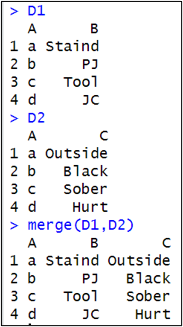
Is order of elements important for merging?
No, the elements in the columns that you use for merging can be in a different order but their values should correspond. Merging is done based on values, not on indices.
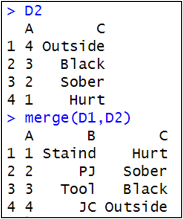
Do these elements have to be unique?
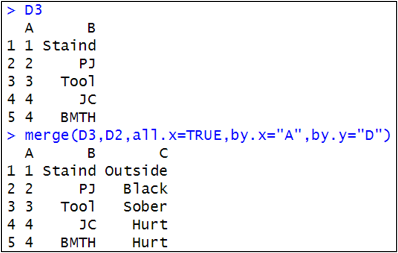
No, elements are allowed to appear multiple times in the columns you use for merging. If an element occurs twice in one of the columns, the corresponding row will appear twice in the merged table.
Difference between all.x and all.y in merge?
You always merge 2 tables. The first one that you mention inside the () is x, the second is y. So in:
merge(D1,D2)D1 is x and D2 is y.
The names of many arguments of merge() contain x or y: that means they refer to the first or the second data frame, e.g. all.x refers to the first data frame and specifies that all rows of the first data frame need to be included in the merged table. So:
merge(D1,D2,all.x=TRUE)
merge(D2,D1,all.y=TRUE)
will give exactly the same result. Only the order of the columns in the merged table will be different.